Take Billing Beyond the
Counter — On Any
Handheld Device
Mobile POS extends your Elixir Retail POS to the queue,
the aisle, a pop-up stall or a customer's doorstep —
same billing logic, same GST, same stock, synced back
to your store in real time.

If you need any help?
Please fill the form here and our team will get back to you at the earliest.
Why trust Elixir Retail?
Checkout Shouldn't Be Stuck
at One Counter
A queue during rush hour, a customer browsing the aisle, a stall at a weekend
market — none of them should mean walking back to a fixed till.
Sell Wherever the
Customer Is
Line-bust during rush hours, bill
in the aisle, or take the counter
to an event or doorstep delivery.
Same Data, Zero Delay
Every mobile sale updates the
same stock, pricing and
customer records as your main
counter, instantly.
No New System to Learn
Same billing logic, GST rules and
offers your staff already know
from Retail POS — just on a
smaller screen.
Not a Separate App — The
Same Platform, In Your Hand
Mobile POS isn't bolted on the side as a disconnected tool. It runs on the same
modules as Retail POS, so nothing sold on a handheld ever falls out of sync with the
rest of your store.
Billing & POS
Inventory Management
Customer Management
Multi-Store Management
What Adding Mobile POS Actually
Changes
Not just "billing on a phone" — here's what's genuinely different once checkout isn't
tied to one fixed counter.
Shorter Queues at Peak Hours
Line-busting means customers get billed where
they're standing, instead of everyone funnelling
into one growing queue.
Sales You'd Otherwise Lose
A customer you can't reach without a counter — a
doorstep, a pop-up, an event — becomes billable,
not missed entirely.
One Source of Truth, Not Two
A mobile sale isn't a separate record to reconcile
later — it updates the same stock, pricing and
customer data as the counter, instantly.
Staff Who Already Know How
Since the billing logic is identical to Retail POS,
there's no second system for staff to learn or
make mistakes in.
Accountability Without a Fixed Till
Every device and login is tied to a specific staff
member, so mobile billing doesn't mean losing
track of who did what.
Flexibility to Sell Wherever You Go
Exhibitions, festivals, deliveries, curbside — the
same billing counter, wherever the opportunity
actually shows up.
Built for Handheld, Not
Adapted to It
Mobile POS is designed around the devices staff actually carry, not a shrunken
version of the counter screen.
Android Handhelds
& Phones
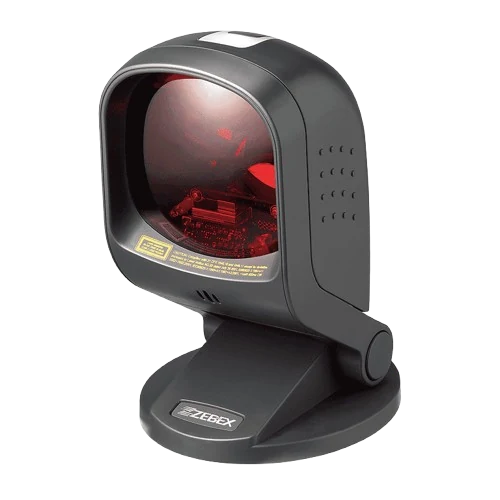
Portable Bluetooth Printers
Portable Card & UPI
Readers
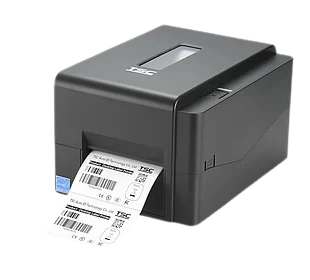
Barcode Sled Attachments
Connects With Your Tools
- UPI & Card Payments
- Tally
- E-Invoice & E-Way Bill
- SMS / WhatsApp
- Online Ordering & Delivery Apps
How a Mobile Sale Gets Back to
Your Store
A sale made on a handheld has to end up in exactly the same place as one made at the
counter. Here's the actual path it takes — and what happens when the signal drops.
Handheld Device
Billing on the floor, a doorstep or an
event
Elixir Cloud
Stock · Pricing · Customers · Reports
If the signal drops mid-sale, the bill still completes on the device and queues locally —
syncing automatically, in order, the moment the connection returns, so nothing doubles up
and nothing gets lost.
Built for Signal You Can't
Always Count On
Events, doorsteps and busy aisles rarely have perfect WiFi. Mobile POS is built
around that reality, not in spite of it.
Offline-First Billing
Keep billing through patchy network at events or
deliveries; it syncs the moment signal returns.
Real-Time Sync to Your Store
Every mobile sale reflects in stock, reports and
customer history instantly.
Secure Device Login
Each device and staff member signs in separately,
with role-based permissions.
12-Hour Dedicated Support
A retail-focused support team, not a generic helpdesk
queue.
What to Check Before Adding Mobile
POS
Not every "mobile POS" is actually connected to your main system. These are the
questions worth asking before you add one — to any vendor.
Does it run on your real data, or a separate app?
A mobile sale that doesn't touch your actual stock and pricing
just creates a reconciliation problem later.Does it work when the signal doesn't?
Events, deliveries and busy aisles rarely have reliable WiFi.
Can each staff member sign in separately?
A shared login on a shared device makes it impossible to know
who actually did what.Does it need special hardware, or run on phones
you already own?A "mobile" system that demands proprietary handhelds isn't
really mobile.Is billing actually identical to the counter?
If tax, pricing or offers behave differently on the handheld, staff
will make mistakes.Can a lost device be shut off without disrupting
the store?Losing a phone shouldn't mean losing control of your data.
Adding Mobile POS Takes
Days, Not a Project
Since Mobile POS runs on infrastructure and data your Retail POS already has,
there's no separate setup to build from scratch.
Add a Device
Install Mobile POS on any supported Android handheld or
phone.
Assign Staff & Roles
Give each staff member their own login and the right level
of access.
Start Billing Anywhere
Bill at the queue, the aisle, or outside the store — synced
instantly.
Mobile POS vs. Counter-Only Billing
| Capability | With Mobile POS | Counter Only |
|---|---|---|
| Line-Busting During Rush Hours | ✓ Yes | Manual, screenshot-based |
| Billing Outside the Store | ✓ Yes | No |
| Real-Time Sync With Main Counter | ✓ Yes | N/A |
| Offline Billing | ✓ Yes | Depends on system |
| Role-Based Device Login | ✓ Yes | Limited |
| Same GST & Reporting Engine | ✓ Yes | Separate tool, if any |
Integrates with: UPI · Cards · Tally · E-Invoice & E-Way Bill · SMS / WhatsApp · Online Ordering
Mobile POS adapts to how your
industry sells
The same handheld billing engine, configured for how each industry
actually operates.
- Super Market
- Textile & Apparel
- Jewellery
- Electronics
- Furniture
- Pharma
- Cosmetics
- Mobile & Electronics Showrooms
FAQ
Frequently asked questions
Mobile POS is handheld billing software that lets staff take checkout beyond the fixed counter — in the aisle, at the door, or at an event — while staying synced with the main store system.
Yes. Mobile POS is built to extend an existing Elixir Retail POS setup, running on the same billing, inventory and customer data rather than as a separate, disconnected app.
Mobile POS runs on standard Android handhelds and phones, and works with portable Bluetooth printers, portable card and UPI readers and barcode sled attachments.
Yes. Mobile POS bills offline-first and syncs automatically the moment a network connection is available, which matters for events, doorstep deliveries and patchy in-store WiFi.
Mobile POS can run on personal Android devices, but each staff member signs in with their own role-based login, so access and activity stay controlled regardless of whose device it is.
Yes. Mobile POS uses the same billing logic, GST rules, pricing and offers as your Retail POS counter, so staff don't need to learn a second system.
Every sale made on Mobile POS updates the same inventory, pricing and customer records as your main counter in real time, or as soon as connectivity returns.
Because access is role-based and tied to individual logins, a device or login can be deactivated centrally without affecting the rest of your store's system.
Most stores can add Mobile POS to an existing Retail POS setup within a few days, since it runs on infrastructure and data that already exist.
Pricing depends on the number of devices, staff and stores involved. Request a custom quote for the right setup.
Mobile POS shortens queues at peak hours, captures sales that would otherwise be missed outside the counter, keeps mobile sales on the same stock and customer data instead of a separate record, and lets staff bill anywhere without learning a new system. See the full breakdown above.
Check whether a sale made on the handheld updates your real inventory, pricing and customer records immediately, or whether it sits in a separate app that needs manual reconciliation later. Elixir Mobile POS runs on the same data as Retail POS by design. Full checklist above.
Ready to Take Billing Beyond the
Counter?
Add Mobile POS to your existing Retail POS setup and bill wherever
your customers are.
FREE DEMO · NO DEVELOPER NEEDED · NO OBLIGATION